How to Download Pinterest Videos on iPhone (Step-by-Step 2026)
If you want to download Pinterest videos on iPhone, you’re not alone.Pinterest is one of the best places on the internet for discovering new ideas. From quick dinner recipes and home décor inspiration to workout routines and DIY projects, millions of iPhone users scroll through Pinterest every day looking for inspiration. But almost every Pinterest user runs into the same moment—you find a great video you want to save, and suddenly realize there’s no download button. Most people assume it isn’t possible to save the video at all.
The good news is that downloading Pinterest videos on your iPhone is actually much easier than most people think. Whether it’s a recipe you want to try later, a workout you want to follow at the gym, or a creative DIY project you don’t want to lose, there’s a simple trick that lets you save it in less than a minute. In this guide, I’ll walk you through a quick step-by-step method to download Pinterest videos directly to your iPhone—without installing any complicated apps or needing any technical skills.
Why Pinterest Doesn’t Offer a Download Button
Many users wonder why Pinterest doesn’t simply include a download button for videos.
The main reason is that Pinterest is designed to keep content inside its own platform. Instead of downloading videos to your phone, the app encourages users to save ideas to boards and revisit them later inside Pinterest.
When you tap the Save button on a pin, the video is stored in one of your Pinterest collections. While this helps organize ideas, it doesn’t actually save the video to your device.
Because of this design, some common tricks people try usually don’t work very well. For example:
• Holding your finger on a video usually doesn’t show a download option
• Saving a pin only bookmarks it inside Pinterest
• Screen recording can reduce video quality and take up extra storage
Pinterest wants users to stay inside the app, but that doesn’t mean downloading videos is impossible. With the right method, you can still save videos quickly and easily.
The Easiest Way to Save Pinterest Videos on iPhone
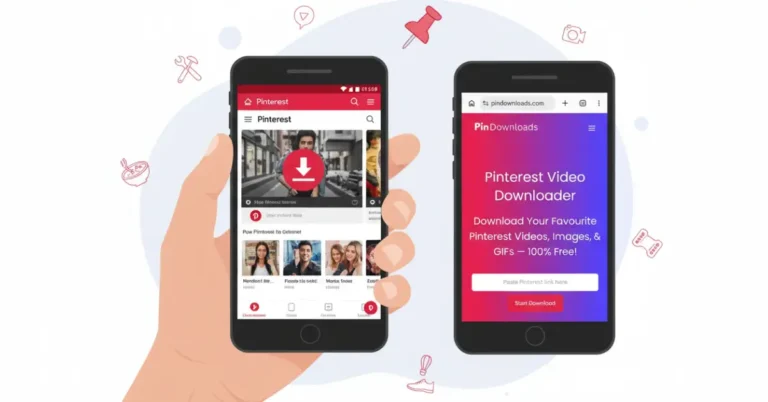
One of the simplest ways to save Pinterest videos is by using PinDownloads, a web-based Pinterest video downloader that works directly in your browser.
👉 You can use our Pinterest Video Downloader tool to quickly download Pinterest videos in high quality.
Since it works on a website instead of an app, the process is fast and simple. You only need to copy the Pinterest video link, paste it into the downloader, and start the download.
Many iPhone users prefer this method because:
• It works perfectly in the Safari browser
• You don’t need to install any apps
• Videos download in their original quality
• The tool is completely free and doesn’t require an account
For most people, this is the fastest and easiest way to save Pinterest videos on an iPhone.
Step-by-Step: How to Download Pinterest Videos on iPhone
Follow these simple steps. Once you know where to tap, the whole process usually takes less than 30 seconds.
Step 1: Find the Pinterest Video
Open the Pinterest app on your iPhone and browse until you find the video you want to download.
Tap the pin to open it in full view and let the video play for a moment. This confirms that the pin contains a video.
Step 2: Copy the Video Link
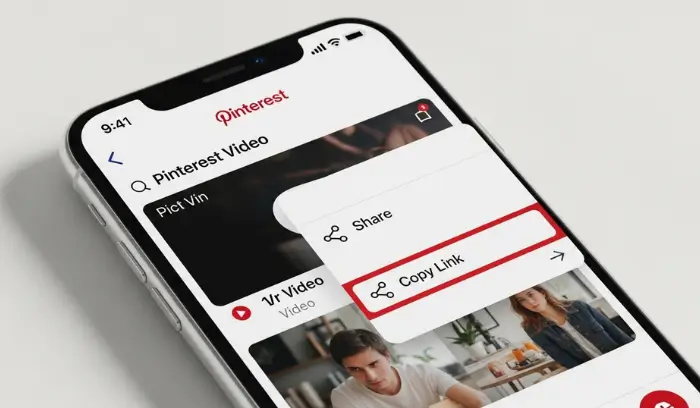
Look for the Share icon on the screen.
Tap it and select Copy Link. This will copy the video URL to your clipboard.
You can also open the three-dot menu on the pin and choose the copy link option there.
Step 3: Open Safari and Visit PinDownloads
Next, open the Safari browser on your iPhone.
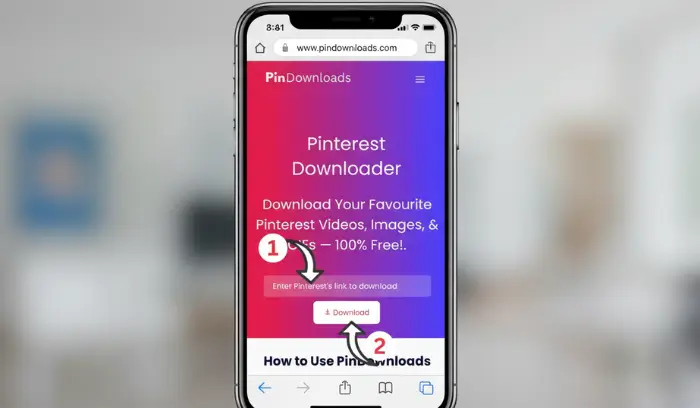
Type pindownloads.com into the address bar and visit the website. Safari usually works best for downloading files on iOS devices.
Step 4: Paste the Pinterest Link
On the PinDownloads homepage, tap the input box.
Select Paste so the copied Pinterest link appears in the field, then press the Download button.
The tool will start processing the video.
Step 5: Save the Video to Your Camera Roll
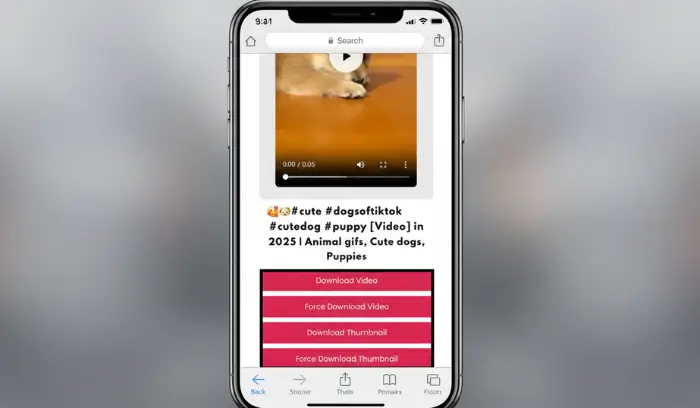
After the video is processed, a download option will appear.
On modern iPhones, Safari will show the download in its toolbar. Open the file, tap the Share icon, and select Save Video.
The video will now appear in your Photos app.
Sometimes the file may first appear in the Files app. If that happens, simply open the file and choose Save Video to move it to your Camera Roll.
Common Problems and Quick Fixes
Downloading Pinterest videos is usually quick and easy, but sometimes small issues can happen. Here are a few common problems and how to solve them.
Can’t Find the Downloaded Video
If the video doesn’t appear in your Photos app right away, check the Safari downloads list by tapping the download icon in the browser toolbar.
If it’s not there, open the Files app and look inside the Downloads folder. In many cases, the video may also appear in the Photos app under Recent.
Video Opens Instead of Downloading
Sometimes the video may start playing in the browser instead of downloading.
If this happens, press and hold the video player. A menu should appear where you can select an option to download the file or save the video.
Download Button Not Working
If the download button doesn’t respond, try switching to Safari if you are using another browser.
Safari is optimized for iPhone downloads and usually works much more smoothly.
Video Quality Looks Low
If the video looks blurry after downloading, it usually means the original video was uploaded in lower quality.
Download tools normally provide the same resolution that exists on Pinterest, so they cannot improve the source quality.
Smart Ways to Organize Downloaded Pinterest Videos
If you download a lot of Pinterest videos, your Camera Roll can become crowded quickly. Organizing your videos can help keep everything easy to find.
Create Video Albums
You can create separate albums in the Photos app for different types of content.
For example, you might create albums for recipes, workout videos, travel inspiration, or DIY ideas.
Enable iCloud Storage
If your phone storage starts filling up, enabling iCloud Photos allows your videos to be stored safely in the cloud while keeping optimized versions on your device.
Review and Delete Unused Videos
Over time, you may collect videos you no longer need. Reviewing your downloads occasionally and deleting unnecessary files helps free up storage.
Use the Favorites Feature
The Favorites feature in the Photos app is great for marking important videos.
Simply tap the heart icon on videos you want to keep easy to find. They will appear in your Favorites album.
Downloading Pinterest Videos for Offline Use
Saving Pinterest videos can be extremely useful when you don’t have internet access.
For example, you might download tutorials before traveling so you can watch them on a plane or in areas with poor signal. Workout videos can also be helpful at the gym where internet connections may be weak.
Offline videos are also easier to share. Once the video is saved to your device, you can send it through AirDrop, iMessage, or other apps without needing a Pinterest link.
Is It Safe to Download Pinterest Videos?
Downloading videos for personal use is generally acceptable. However, it’s important to respect the rights of content creators.
Avoid reuploading, selling, or claiming ownership of videos that you did not create. Always give proper credit if you plan to share content publicly.
Alternative Method: Using the iOS Shortcuts App
Some advanced users prefer using the iOS Shortcuts app to automate downloads.
While this method can sometimes work faster, it usually requires extra setup and technical knowledge.
In addition, shortcuts may stop working whenever Pinterest updates its platform. For most people, using a browser-based downloader remains the easiest and most reliable solution.
Frequently Asked Questions
Can I download Pinterest videos directly on my iPhone?
Yes. You can download Pinterest videos by copying the video link and using an online Pinterest video downloader. After processing the link, the video can be saved to your iPhone.
Do I need to install an app to download Pinterest videos?
No. Most users download Pinterest videos directly through the Safari browser using online tools.
Can I watch Pinterest videos offline after downloading them?
Yes. Once the video is saved on your device, you can watch it anytime without an internet connection.
Are Pinterest videos downloaded in high quality?
Most download tools provide the same quality as the original video uploaded to Pinterest.
Is downloading Pinterest videos allowed?
Downloading videos for personal use is generally acceptable, but you should always respect the original creator’s rights.
Which browser works best for downloading Pinterest videos on iPhone?
Safari usually works best because it handles file downloads more smoothly on iOS devices.
Where are downloaded Pinterest videos saved on iPhone?
Most downloaded videos will appear in your Camera Roll inside the Photos app. Sometimes they may first appear in the Downloads folder in the Files app.
Start Saving Pinterest Videos Today
Once you learn this method, you can build your own collection of Pinterest videos — recipes, workouts, and DIY tutorials — ready to watch anytime, even without the internet.
By using Safari and a reliable Pinterest video downloader like PinDownloads, you can download and store videos in seconds without installing any apps.
The next time you discover a useful recipe, workout routine, or creative idea on Pinterest, simply copy the video link, paste it into the downloader, and save it to your device.
Soon you’ll have your own collection of Pinterest videos ready whenever inspiration strikes.