
Pinterest Image Downloader
Save High-Quality Pinterest Images in Seconds — Fast, Easy, and Reliable.
PinDownloads helps you access publicly available Pinterest images quickly and efficiently. We do not host or store any Pinterest content on our servers, and users are responsible for complying with copyright laws and content ownership rights.
Looking for a simple way to save Pinterest images in high quality? PinDownloads helps you access and save publicly available Pinterest content quickly and easily. Whether you’re collecting design inspiration, DIY ideas, recipes, fashion trends, or creative references, our tool provides a fast and user-friendly experience across desktop and mobile devices.
How Can You Download Pinterest Images Using PinDownloads?
PinDownloads is designed to be simple and intuitive. Whether you’re using PinDownloads on your mobile or desktop, the process is quick and easy. Here’s how you can start downloading your favorite Pinterest images and GIFs today.
How to Save Pinterest Images in 3 Simple Steps
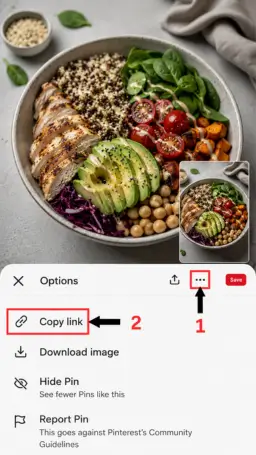
#1. Copy the Pinterest Link
Open Pinterest and copy the link of the image you would like to save.

#2. Paste the Link
Paste the Pinterest link into the input field and let PinDownloads process the content.

#3. Save Your Image
Preview the image and save it to your device in its available quality.
How to Use PinDownloads on Any Device
PinDownloads works smoothly on mobile phones, tablets, laptops, and desktop computers. Whether you’re browsing Pinterest for inspiration, ideas, or creative content, you can quickly access and save publicly available images with a simple and user-friendly process.
Using PinDownloads on Desktop Computers
Step 1: Find the Image
Open the Pinterest app and browse for the image you would like to save.
Step 2: Copy the Link
- Tap the share or options menu and copy the Pinterest image link.
Step 3: Open PinDownloads
Launch your mobile browser and visit PinDownloads.
Step 4: Paste the Link
Paste the copied Pinterest link into the input field and process the content.
Step 5: Save the Image
Preview the image and save it to your device for easy access whenever needed.
Using PinDownloads on Desktop Computers
Step 1: Select the Image
Open Pinterest in your browser and choose the image you want to save.
Step 2: Copy the URL
Copy the image URL directly from your browser address bar.
Step 3: Visit PinDownloads
Open PinDownloads in a new browser tab.
Step 4:Paste the URL
Paste the Pinterest URL into the input field and process the content.
Step 5: Save the image
Review the image and save it to your computer in the available quality.
Why Choose PinDownloads for Saving Pinterest Images?
Here’s why PinDownloads stands out as the best Pinterest Image Download Tool:
- Fast & Easy to Use: Save Pinterest images in just a few simple steps with a clean and user-friendly interface.
- High-Quality Images: Access Pinterest images in their available quality without unnecessary compression or loss of detail.
- Works Across Devices: Use PinDownloads on smartphones, tablets, laptops, and desktop computers with ease..
- No Registration Required: Get started instantly without creating an account or completing lengthy sign-up forms.
- Secure Experience: Your privacy matters. PinDownloads is designed to provide a safe and reliable user experience.
- Simple Interface: A straightforward design helps you access Pinterest content quickly and efficiently.
- Convenient Access: Process Pinterest image links without installing additional software or browser extensions.
- Designed for Everyday Use: Whether you’re collecting inspiration, creative ideas, recipes, fashion trends, or design references, PinDownloads helps simplify the process.
Looking for Pinterest video support as well? Explore our Pinterest Video Tool for additional media options.
How to Save Pinterest Images Using Pinterest
Pinterest provides built-in options that may allow users to save certain images directly from the platform, depending on the content and the permissions set by the content owner.
To save an image, open the image on Pinterest and check the available options from the menu. Features and availability may vary depending on the device, Pinterest app version, and the original content source.
Always respect copyright laws, content ownership rights, and Pinterest’s Terms of Service when saving, sharing, or reusing any content.


Frequently Asked Questions (FAQs)
Do I need to sign up to use the Pinterest Image Downloader?
No. PinDownloads can be used without creating an account or logging in. Simply paste a valid Pinterest image link and follow the on-screen instructions.
Is PinDownloads.com a secure tool for downloading Pinterest images?
Yes. PinDownloads is designed to provide a secure and user-friendly experience. We do not host or store Pinterest content on our servers, and users remain responsible for complying with copyright laws and content ownership rights.
Is PinDownloads.com truly free to use for downloading Pinterest images?
Yes. PinDownloads is available to users without subscription fees or mandatory registration requirements.
Where are the Pinterest images saved after downloading?
The Pinterest images are saved to your device’s default download folder:
Windows: Press Ctrl + J to view downloads.
Mac: Press Cmd + Shift + J to access your download history.
Mobile Devices: Open your browser’s download manager or file explorer to find your downloads.
Is there a limit to how many Pinterest images I can download?
PinDownloads is designed to provide convenient access to publicly available Pinterest content. Availability may vary based on technical limitations and platform requirements.
What types of Pinterest content are supported?
PinDownloads supports publicly available Pinterest image content and may support additional media formats depending on availability and source accessibility.
Is the Pinterest image downloader compatible with all devices?
Yes. PinDownloads works on most modern devices, including Android phones, iPhones, tablets, Windows PCs, and macOS computers.
Are Pinterest images downloaded in specific formats?
Yes, Pinterest images are downloaded in JPG or PNG format, depending on the original format of the image on Pinterest.
Does PinDownloads.com track or store my download history?
No. PinDownloads does not maintain a personal download history for users. Content is processed from publicly available sources, and users are responsible for their own use of downloaded content.
Is downloading Pinterest images using this tool legal?
The legality of downloading and using content depends on copyright ownership, permissions, and applicable laws in your region. Users should only save, share, or reuse content when they have the necessary rights or permission from the content owner.
How do I download Pinterest images using PinDownloads.com?
To download Pinterest images, follow these simple steps:
Copy the link of the Pinterest image you want to download.
Paste it into the input box on PinDownloads.com.
Click the download button, and the image will be saved to your device.
Does PinDownloads host Pinterest images on its servers?
No. PinDownloads does not host, store, archive, or claim ownership of Pinterest images, videos, or other media content.
Who is responsible for how downloaded content is used?
Users are solely responsible for ensuring that any content they save, share, or reuse complies with copyright laws, licensing requirements, and platform terms of service.
Save Pinterest Images Quickly and Easily with PinDownloads!
Looking for a simple way to save Pinterest images in high quality? PinDownloads offers a fast, easy-to-use experience on both desktop and mobile devices. Whether you’re collecting design inspiration, recipes, fashion ideas, DIY projects, or creative references, PinDownloads helps you access publicly available Pinterest content quickly and efficiently.
Please ensure that you have the necessary rights or permissions before saving, sharing, or reusing any content. Always respect copyright laws, content ownership rights, and platform terms of service.