
Загрузчик Pinterest
Загрузчик видео с Pinterest — Скачивайте видео, изображения и GIF 100% бесплатно!
Как использовать Загрузчик видео с Pinterest?
PinDownloads — это лучший Загрузчик видео с Pinterest, который позволяет легко скачивать видео, изображения и GIF-изображения с Pinterest в высоком качестве. Независимо от того, используете ли вы мобильное устройство или компьютер, это быстро, бесплатно и просто. Скачивайте свои любимые материалы с Pinterest за несколько секунд с помощью нашего Загрузчика видео с Pinterest.
Простые шаги для использования загрузчика видео с Pinterest
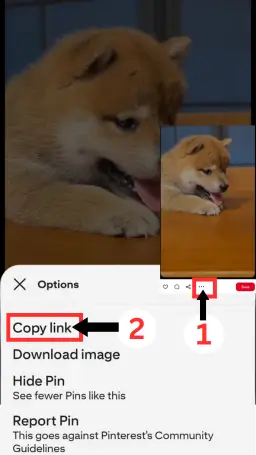
#1. Скопируйте ссылку Pinterest
Скопируйте URL видео, изображения или GIF с Pinterest, который вы хотите сохранить.
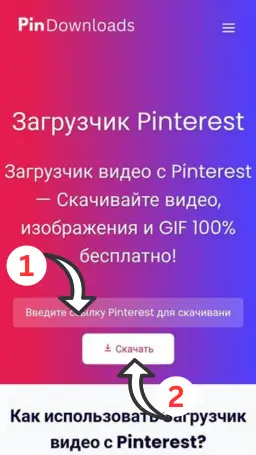
#2. Вставьте в PinDownloads
Вы можете скачать видео, изображение или GIF с Pinterest, вставив скопированную ссылку в поле и нажав кнопку “Скачать”
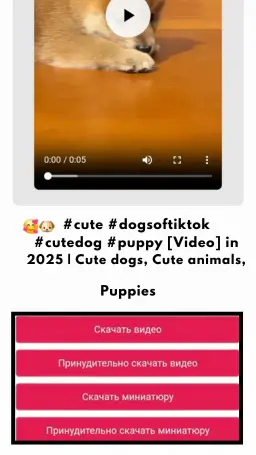
#3. Скачать и сохранить
Нажмите “Скачать” и сохраните свой контент за несколько секунд.
Как легко скачать видео, изображения или GIF с Pinterest.
С помощью инструмента Pinterest Downloader скачивание ваших любимых видео, изображений или GIF с Pinterest становится легким, независимо от того, используете ли вы мобильное устройство или компьютер. Это быстро, бесплатно и без хлопот, регистрация не требуется. Следуйте простым шагам ниже и начните сохранять свои любимые материалы уже сегодня!
Как скачать видео, изображения и GIF с Pinterest с помощью нашего загрузчика видео с Pinterest на мобильном устройстве?
Шаг 1: Найдите свой любимый контент
Откройте приложение Pinterest и найдите видео, изображение или GIF, которые вы хотите скачать.
Шаг 2: Скопируйте ссылку
- Используете последнюю версию приложения? Нажмите на значок ••• в правом нижнем углу экрана.
- На старой версии? Нажмите на значок ••• в правом верхнем углу.
- Затем нажмите “Скопировать ссылку“, чтобы получить URL.
Шаг 3: Используйте PinDownloads для сохранения вашего контента
Перейдите на PinDownloads.com, вставьте скопированную ссылку в поле ввода и нажмите кнопку “Скачать“.
Шаг 4: Предпросмотр и скачивание
Посмотрите предварительный просмотр вашего контента и нажмите кнопку Скачать.
Шаг 5: Сохраните и наслаждайтесь
Ваш файл будет сохранен прямо на вашем устройстве. Просто.
Как скачать видео, изображения и GIF с Pinterest с помощью загрузчика видео с Pinterest на компьютере?
Шаг 1: Откройте Pinterest и выберите ваш контент
Перейдите на Pinterest в вашем браузере и найдите видео, изображение или GIF, которые вы хотите скачать.
Шаг 2: Скопируйте ссылку
Нажмите на контент, чтобы открыть его полностью. После этого скопируйте URL из адресной строки вашего браузера.
Шаг 3: Перейдите на PinDownloads
Откройте новую вкладку и перейдите на PinDownloads.com.
Шаг 4: Вставьте URL и начните скачивание
Вставьте скопированный URL в поле ввода и нажмите кнопку Скачать. Предпросмотр вашего контента появится сразу ниже
Шаг 5: Сохраните на свой компьютер
Нажмите кнопку Скачать и сохраните видео или изображение с Pinterest непосредственно на ваш ПК.
Основные функции Загрузчика видео с Pinterest:
- Поддержка HD и 4K — больше никаких компромиссов с качеством.
- Гарантия конфиденциальности — ваши скачивания остаются полностью конфиденциальными; мы не отслеживаем вашу активность.
- Безопасно и надежно — наш инструмент полностью свободен от вредоносных программ и вирусов.
Часто задаваемые вопросы (FAQ)
Нужно ли регистрироваться или входить в систему, чтобы использовать PinDownloads.com?
Нет, совершенно не нужно регистрироваться или создавать аккаунт. Просто скопируйте ссылку на видео, изображение или GIF с Pinterest, вставьте её в поле ввода и нажмите Скачать — легко и анонимно.
Безопасно ли использовать PinDownloads.com?
Да, ваша безопасность — наш главный приоритет. PinDownloads.com абсолютно безопасен и не содержит вирусов или вредоносных программ. Вы можете использовать наш инструмент с полной уверенностью на всех ваших устройствах.
Этот инструмент действительно бесплатен?
Да! PinDownloads.com полностью бесплатен — никаких скрытых платежей, подписок. Неограниченные скачивания без затрат.
Где сохраняются скачанные файлы?
Скачанные файлы сохраняются в папке загрузок по умолчанию на вашем устройстве:
Windows: Нажмите Ctrl + J, чтобы просмотреть загрузки.
Mac: Нажмите Cmd + Shift + J, чтобы увидеть историю загрузок.
Мобильные устройства: Проверьте менеджер загрузок в вашем браузере или файловый менеджер.
Есть ли ограничение на количество файлов, которые я могу скачать?
Нет! Вы можете скачать неограниченное количество видео, изображений и GIF с Pinterest в любое время. Без ограничений — всегда.
Какой контент я могу скачать?
Вы можете скачать любой публичный контент с Pinterest, включая:
Видео (MP4)
Изображения (JPG/PNG)
GIFs
Совместим ли этот инструмент со всеми устройствами?
Да! PinDownloads.com работает безупречно на:
Android-смартфонах и планшетах
iPhone и iPad
ПК и ноутбуках с Windows
Устройствах macOS
Могу ли я скачать прямые видео с Pinterest?
Да, но только после завершения прямого эфира. Как только трансляция закончится, скопируйте ссылку на видео, вставьте её в наш инструмент и нажмите Скачать.
Видео скачиваются в формате MP4?
Да, все видео с Pinterest автоматически конвертируются и скачиваются в формате MP4 для максимальной совместимости.
Сохраняет ли PinDownloads.com мои скачивания или отслеживает меня?
Нет, мы никогда не отслеживаем, не регистрируем и не храним ваши скачивания. Все файлы загружаются напрямую с серверов Pinterest. Ваша активность остается полностью конфиденциальной и анонимной.
Законно ли скачивать контент с Pinterest?
Наш инструмент предназначен только для личного использования. Пожалуйста, убедитесь, что у вас есть право на скачивание или повторное использование контента, и всегда уважайте авторские права и условия использования Pinterest.
Как скачать с Pinterest с помощью PinDownloads.com?
Это очень просто:
Скопируйте ссылку на видео, изображение или GIF с Pinterest.
Вставьте её в поле ввода на PinDownloads.com.
Нажмите кнопку “Скачать”.
Сохраните файл на ваше устройство.
Сохраните свой любимый контент с Pinterest уже сегодня.
С помощью PinDownloads вы можете легко сохранить свой любимый контент с Pinterest. Независимо от того, являетесь ли вы менеджером социальных сетей, создателем контента или любителем дизайна, PinDownloads упрощает процесс сохранения контента.